


Simple Invoice Manager
4.7734.00 Reviews
App Specs
- Version
- 5.0.82
- Updated On
- License
- Free
- Downloads
- 5,000,000+
- Developer
- Tacktile Systems Private Limited
- Categories
- Business
- Platform
- Android
Screenshots
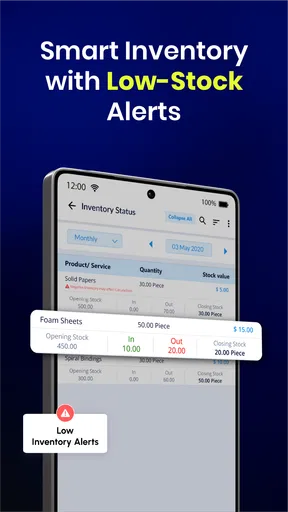
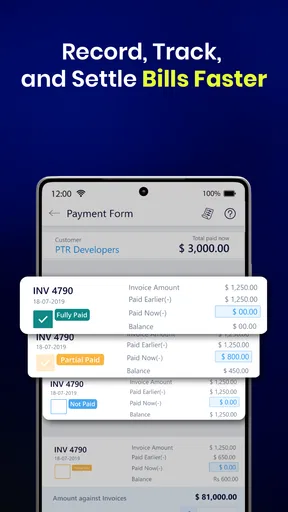
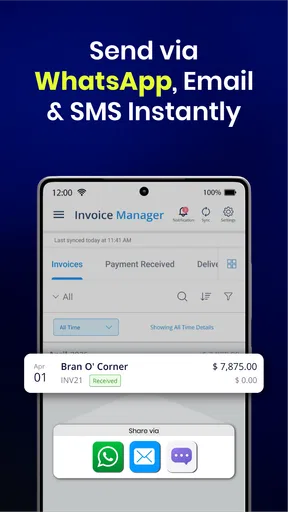
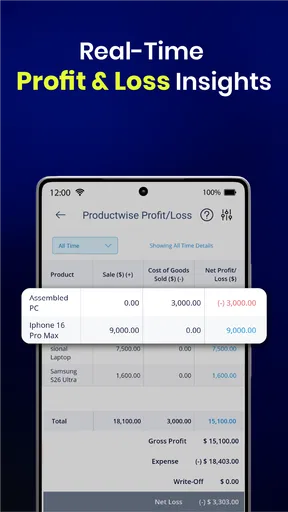
 Analysis by AppCompare
I judge an invoicing app less by how impressive it feels on day one than by whether I still reach for it when work gets busy. Simple Invoice Manager is aimed at the practical, repeatable task of billing clients, and its appeal is easy to understand: make an invoice, record the payment, and keep the paperwork from taking over the day. After trying it, I see the strongest case for it in a small business or freelance routine where invoices are frequent enough to need a system but not so complex that they demand a full accounting suite.
Getting Started with Ease
First things first, downloading and setting up Simple Invoice Manager is a breeze. Whether you’re using Android or iOS, you’ll find it in your app store, ready to be installed in a jiffy. Once it’s on your device, the setup process is smooth sailing. You just need to input some basic information about your business, and you’re good to go.
The interface is clean and intuitive, which is something I really appreciate. No one wants to spend hours trying to figure out how to use a new app. With this one, everything is straightforward, and you'll be creating invoices in no time.
Why the first week feels useful
The first-week benefit is less about discovering a complicated system and more about removing small bits of friction. If you have been drafting bills in a document, copying old files, or trying to remember which client has paid, a dedicated invoicing workflow gives those tasks a clear home. It is the sort of improvement you notice when a client asks for a bill while you are away from your desk and you can handle the request before it slips your mind.
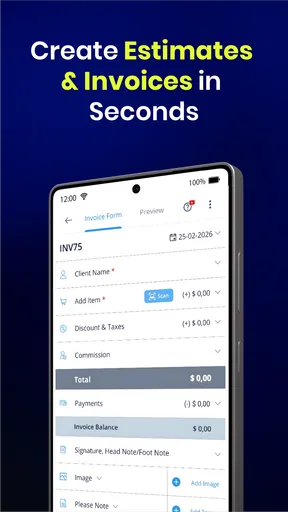
A practical way to start is to enter your business details carefully, then create one ordinary invoice and inspect it as if you were the client receiving it. Check that your contact information is right, that the description makes sense without extra explanation, and that the amount and payment terms are clear. This small test is more useful than rushing to create a stack of records, because it helps you catch setup mistakes before they become part of your routine.
That ease also means the app is approachable for someone who does not think of themselves as an accounts person. Tacktile Systems Private Limited has kept the focus on billing rather than presenting the app as a substitute for every part of running a business. I would still treat the first few invoices as a learning period: review each one before sending, and keep your own records consistent while you decide whether the workflow suits you.
Features That Stand Out
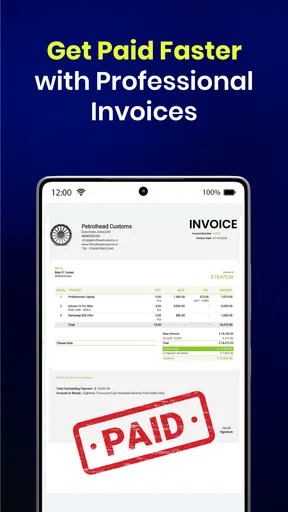
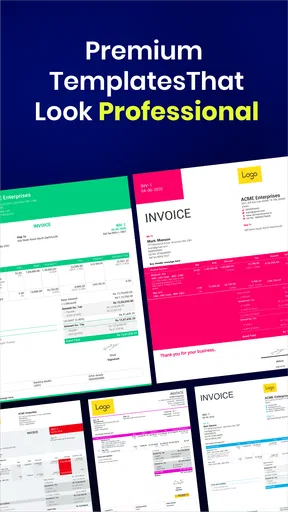
One of the things I love about this app is its ability to create professional invoices on the fly. You can customize them with your logo and choose from different templates to suit your business style. The app also allows you to track payments, which means you can easily see who’s paid and who still owes you money. It’s like having a personal accountant in your pocket!
Worth Reading Before You Choose

EA SPORTS FC Mobile 26 Is a Bigger Football Game, but It Takes Time

Flipboard Shows What News Apps Must Do Beyond the Feed

Switching to Android Auto Means Rethinking Your Driving Routine

Google Calendar Makes a Crowded Week Easier to Manage

Ludo King Makes the Most of the Minutes Between Plans

Baby Panda World Brings Quick Play to Modern Phones, but Its Game Library Feels Busy
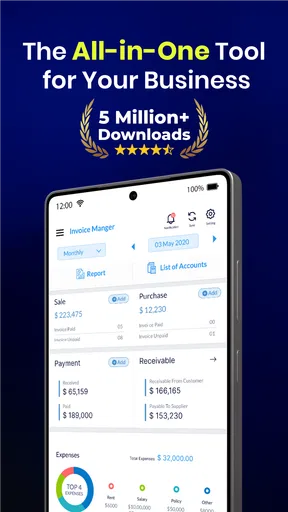
Another standout feature is the reporting tool. If you’re like me, you probably hate sifting through endless data to get a clear picture of your finances. The app generates detailed reports that make it easy to see your income and expenses at a glance. It’s perfect for keeping tabs on your cash flow.
Keeping a billing habit from fading
The more important question is whether the app remains useful after the novelty wears off. For me, recurring value depends on making invoice creation part of the same routine as finishing a job. If I wait until the end of the month to reconstruct what I did, even a simple tool cannot prevent missing details. Creating a draft while the work is fresh, then checking it before sending, is a better habit than treating the app as a storage box for last-minute paperwork.
Payment tracking can also support a modest but useful follow-up routine. I would review outstanding invoices at a regular point in the week, rather than checking constantly or relying on memory. The value is not that the app makes a client pay; it is that a clear record gives me a better basis for deciding whom to contact and what to ask. For a solo worker with a manageable client list, that can turn an awkward task into a short administrative check-in.
Reports are most helpful when I use them to answer a specific question, such as whether income has been steady or which period needs closer attention. They should not replace careful bookkeeping or professional tax advice. If your finances include complicated expenses, payroll, inventory, or several revenue streams, a snapshot from an invoicing app may be too narrow to guide decisions on its own. I would use those reports as a quick orientation, then rely on the appropriate accounting process for formal records.
Smooth Integration
Now, let’s talk about integration. Simple Invoice Manager plays well with others. You can sync it with your email to send invoices directly from the app, which is super convenient. Plus, it integrates with payment gateways like PayPal and Stripe, so you can get paid faster. No more waiting for checks in the mail!
The app also supports multiple currencies, which is a big plus if you do business internationally. It automatically converts currency based on the latest exchange rates, saving you the hassle of manual calculations.
Where a mobile workflow helps—and where it doesn’t
For a realistic day-to-day example, imagine finishing a short design job while away from your workspace. You can prepare the bill while the agreed work and amount are still fresh, send it through your usual email flow, and later check whether the payment has been recorded. That is a sensible use of a phone-first invoicing tool: it closes the loop between completing work and asking to be paid without saving the task for a late-night desk session.
On the other hand, a phone screen is not ideal for reviewing a complicated set of charges or carefully comparing many records. I would handle straightforward invoices on the move, but give unusual or high-value bills a deliberate second look before sending. A useful habit is to keep descriptions specific enough that both you and the client can recognize the work later. “Consulting” may be quick to type; a short description of the actual task is more helpful when a payment question comes up.
Offline access can be valuable when connectivity is unreliable, but I would not assume that a change made without a connection has reached every other place you use the app until syncing has completed. If I prepare an invoice offline, I would check it again once I am connected and confirm that the intended action—especially sending or recording a payment—has gone through. That simple pause reduces the risk of treating a saved draft as a finished transaction.
When a dedicated invoice app is the right scale
Compared with building invoices in a spreadsheet or reusing a word-processing template, a dedicated billing app can make payment status easier to keep alongside the invoice itself. The trade-off is that a spreadsheet is more flexible for unusual calculations and can be shaped around a business’s own tracking habits. If you only send a bill occasionally and already have a reliable template, moving everything into an app may add another place to maintain without saving much time.
At the other end, a full accounting platform is usually the better fit when invoicing is only one part of a larger operation. Businesses that need tightly connected bookkeeping, tax preparation, inventory tracking, or team-wide financial controls should assess those needs before relying on a simpler invoice-focused workflow. This app makes the most sense when the problem is getting professional bills out and monitoring whether they have been paid, not managing every financial process in one system.
It is also a good match for people who work directly with clients and want to issue bills without returning to a computer: independent service providers, small operators, or anyone whose jobs are easy to describe and price. I would be more cautious if you need extensive approval steps, detailed accounting oversight, or a highly customized process. In those cases, convenience alone is not enough; the tool has to fit the controls your work requires.
On-the-Go Management
For those of us who are always on the move, this app is a lifesaver. You can manage your invoices anytime, anywhere, right from your phone. Need to send an invoice while you’re in a café or on a train? No problem. The app’s mobile-friendly design ensures you have full functionality at your fingertips.
And let’s not forget about the offline mode. Even if you’re in a place with no Wi-Fi or data connection, you can still create and edit invoices. The app will sync everything once you’re back online. It’s like having a little bit of magic in your pocket.
The small costs of staying organized
Any invoicing system creates a maintenance task: client details, invoice descriptions, payment status, and business information need to remain accurate. The app can make those records easier to handle, but it cannot decide whether a payment has actually cleared or whether a charge is described correctly. I would make it part of the weekly admin routine to reconcile what the app says with the payments I have received, rather than letting a status label stand in for checking the transaction.
There is also a habit trade-off in keeping records on a phone. Mobile access makes it easier to act promptly, but it can encourage rushed data entry between appointments. If your work involves repeat clients, take a moment to confirm the correct client and invoice details each time; speed is useful only when it does not create cleanup later. For a small workload, this attention is manageable. With a growing team and a large volume of transactions, manual checks can become a reason to choose a more structured system.
The app is free to download, with optional in-app purchases ranging from $2.49 to $29.99 per item. I would decide whether any paid option is worthwhile only after identifying a specific need in my own workflow, rather than paying simply because an upgrade is offered. Its Everyone age rating and broad availability make it approachable, but the real question is fit: whether its billing approach handles the work you actually do.
Where fatigue can creep in
The main source of fatigue is not necessarily a difficult interface; it is maintaining two competing records. If you continue making invoices in old templates while only entering some transactions into the app, the extra system can become another chore instead of a solution. I would pick one primary method, move current work into it gradually, and keep older records accessible for reference. A clean boundary between past paperwork and new invoices is often easier than trying to reorganize everything at once.
Another limitation is scope. A business may start with simple client billing and later need stronger reporting, more detailed expense workflows, or broader accounting controls. A 4.7 average from around 35,000 ratings and more than 5 million installs show that many people have chosen the app, but popularity does not tell me whether it covers a particular company’s requirements. I would test the actual workflow with a few ordinary invoices before depending on it for a more demanding operation.
Version 5.0.39 is the current version, and the app has been available since August 21, 2014. That history gives it a long presence in the business-app space, but I would still judge it by whether it fits my current routine and device. It supports Android from version 7.0, so anyone using an older device should check compatibility before planning a switch. The app has 718 written reviews, another useful sign of an established audience, though individual experiences can differ depending on the way each person invoices.
Final Thoughts
Overall, I’m genuinely impressed with Simple Invoice Manager. It takes the headache out of financial management and gives you more time to focus on growing your business. Whether you’re a freelancer, a small business owner, or just someone who wants to keep their finances in order, this app is a fantastic tool.
So, if you’re looking for an easy and efficient way to handle your invoices, give Simple Invoice Manager a try. It’s user-friendly, packed with features, and designed to make your life easier. Trust me, you’ll wonder how you ever managed without it!
My long-term verdict
I would keep this app if invoice creation and payment follow-up are recurring parts of my week, because those are the jobs it is built to make easier. I would not keep it out of habit if I send very few invoices, prefer a spreadsheet, or have outgrown a simple billing workflow. The lasting value comes from consistently recording each bill and checking what remains unpaid, not from opening the app often for its own sake.
For a freelancer or small client-based business, I would start with a handful of real invoices, check the presentation and payment routine, and see whether it reduces the amount of administrative work I postpone. If it does, the convenience can earn a permanent place on the phone. If I find myself duplicating records or needing broader financial controls, that is a practical signal to move to a different kind of tool rather than force this one to do a bigger job than it is meant to handle.
Pros
- User-friendly interface for quick invoicing.
- Customizable templates for branding needs.
- Supports multiple currencies and languages.
- Cloud sync for data access across devices.
- Detailed reports for financial insights.
Cons
- Limited integration with accounting software.
- No offline mode for invoice creation.
- Basic analytics lack advanced features.
- No customer support chat available.
- Limited payment gateway options.
FAQs for Simple Invoice Manager
What features does Simple Invoice Manager offer?
Simple Invoice Manager provides a comprehensive range of features designed to streamline the invoicing process. Users can create and customize invoices, track payments, and manage client information. The app also offers reporting tools to analyze financial data and integrates with popular payment gateways, making it a versatile choice for small business owners.
Is Simple Invoice Manager easy to use for beginners?
Yes, Simple Invoice Manager is designed with user-friendliness in mind. The intuitive interface allows users, even those with minimal technical skills, to navigate through its features effortlessly. The app includes step-by-step guides and tutorials to help new users get started quickly with creating and managing invoices.
Does Simple Invoice Manager support multiple currencies?
Simple Invoice Manager supports multiple currencies, making it ideal for businesses that operate internationally. Users can easily switch between currencies when creating invoices, ensuring accurate billing for international clients. The app also provides real-time exchange rates to keep your financial records up-to-date and accurate.
How secure is the data within Simple Invoice Manager?
Security is a top priority for Simple Invoice Manager. The app employs robust encryption methods to protect sensitive financial and client data. Regular updates and security patches are implemented to safeguard against potential threats. Additionally, users can set up secure access controls to ensure only authorized personnel can access the data.
Is there customer support available for Simple Invoice Manager?
Yes, Simple Invoice Manager offers comprehensive customer support to assist users with any issues or questions. Support is available through various channels, including email, live chat, and an extensive knowledge base. The responsive support team is dedicated to providing timely assistance to ensure a smooth user experience.


